01
Copy Your Installation
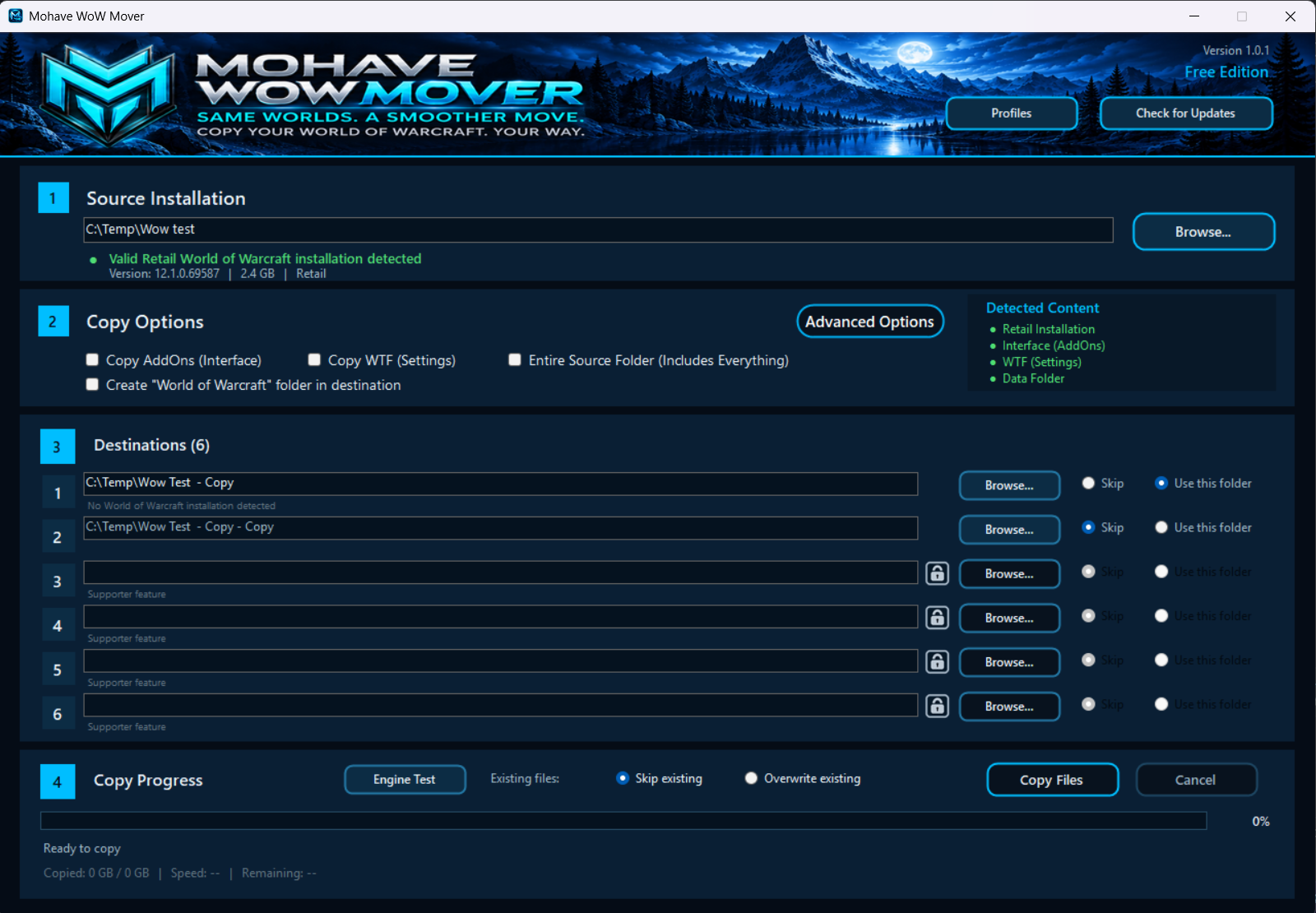
Select your World of Warcraft source folder and copy the installation to one or more destination folders.

MOHAVE TECHNOLOGIES SOFTWARE

Copy and manage World of Warcraft installations while preserving the files and folder structure needed for different environments.
BUILT FOR MULTIPLE INSTALLATIONS
WoW Mover simplifies the process of maintaining multiple World of Warcraft installations without manually copying and organizing large game folders.
Select your World of Warcraft source folder and copy the installation to one or more destination folders.
Maintain separate installations for different servers, environments, or configurations from one application.
Keep the required World of Warcraft directory structure intact while files are copied to their destinations.
See destination status and progress directly in the application while WoW Mover handles the copy process.
DOWNLOAD
Download the latest Stable release of WoW Mover for Windows. Version information is provided directly by the Mohave Update Platform.
SYSTEM REQUIREMENTS
INSTALLATION
Download the latest Stable release of Mohave WoW Mover.
Extract the contents of MohaveWoWMover.zip to a folder on your computer.
Launch MohaveWoWMover.exe and select your World of Warcraft source and destinations.